
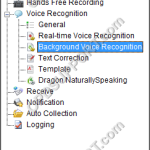
This guide goes through how to configure the background voice recognition settings. Note: You must have a Dragon Profile configured with ODMS for this to work please follow the guide here Open the Dictation Module or the Transcription Module Click on Tools > Options > Workflow tab Click Background Voice Recognition. Enable the two options […]
Webmaster
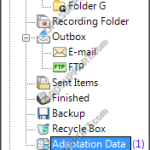
How to use Adaptation
This article details how to use Adaptation. Adaptation helps to improve profile accuracy. Note: You must have a Dragon profile configured in order to do Adaptation please follow the guide here. Dragon will listen to the audio file to carry out two different types of profile adaptation: Acoustic: Listens to the quality of the audio […]
Using Fields
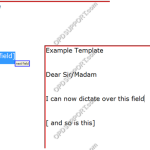
Fields are used in document templates to make voice recognition quicker and easier. Fields are always shown in square brackets on the document template. There are two types of fields for use with speech recognition: Custom Field: This is any field that you might add to the template in order to fill it in […]
Recording Format
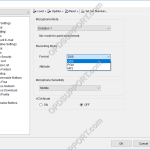
This guide details how to change the recording format. This requires the Dictation Module or the Device Customisation Program to be installed in order to make these changes. ODMS R8/R7 ODMS R6 ODMS R8/R7 Open the Dictation Module or the Device Customisation Program. Connect the recorder to the PC. Click on Device -> Device Settings. […]
Creating an MST package
This guide will take you through how to create an MST package in the SCP for customised deployments. To create an MST package, click on the Software tab. Select a software package from the Package List either in ODMS or DSS Player Pro. Click the Customize button shown in the image below. The Customize Installation […]
ODMS Client Workgroup Installation Guide
This guide presumes you have installed the ODMS for Administrator components to the server, otherwise please follow the ODMS for Admin Installation guide. There are a number of ways of installing the ODMS client software in Workgroup Mode. This guide will cover the main installation methods. ODMS Launcher wizard Group Policy Software Installation Deployment. Silent […]
Virtualisation Compatibility
This article details what versions of virtual products are supported and compatible with the Olympus products. Key Description Compatible Not Compatible * End of life Note: There maybe some hardware limitations with certain software generations please see the Hardware Compatibility Matrix. For operating system compatibility please click here. For Olympus to work in a virtual environment […]
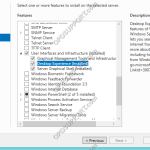
ODMS Workgroup Guide
This guide details how to install and configure ODMS in a workgroup environment. It provides step by step instructions on installing each component and how to deploy the software. + – Prerequisite Click to collapse Preparing for Installation Before beginning the installation, the below prerequisites must be met. This guide assumes a new installation is being […]
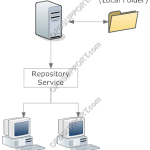
ODMS for Admin Installation Guide
This guide provides step by step instructions on how to install the ODMS for Administrator components to the server for an ODMS Workgroup mode setup. This will cover the following topics: Repository Setup Repository Service System Configuration Program License Manager + – Repository setup Click to collapse Depending on the network configuration and preference, […]
Device Security
This guide will take you through how to configure PIN lock, encryption and Data Loss Prevention (DLP) to ensure security of the device and the recordings. PIN lock prevents unauthorized entry to the device by prompting the user to enter a four digit pin. Encryption prevents users from playing the file on a computer by […]