
Whether you need to dictate or type, you can work remotely with Olympus. This article covers the typical use cases for remote working… Still unsure? Please contact us, we are here to help. Free Trial With Olympus, you can use the Free Trial of the ODMS R7 software to make sure you’re up and running with […]
Webmaster
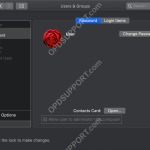
License number is incorrect – Mac Standard User
When installing DSS Player for Mac, you may get the error message “The license number you have entered is incorrect. Please confirm your license number.” If the license is correct and the software version downloaded is compatible with the OS, then the next step to check is whether this user is an administrator by following […]
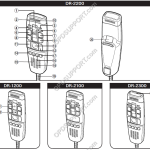
Quick Start Guide for DR-1200/2100/2200/2300
This article goes through the basics of using your DirectRec II/RecMic I Series. Getting Familiar with the Device 1 Built-in microphone 12 RIGHT (Right) button 2 Recording three colour LED (red, green and blue) 13 Trackball 3 Insert Recording LED (green) 14 F1 (Function 1) button 4 Volume down button 15 F2 (Function 2) button […]
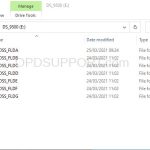
Manual Firmware Update Procedure
This article describes how to perform a manual firmware update for Olympus Digital Voice Recorders (DVR). + – Windows Click to collapse Connect DVR to a computer Browse to the internal memory “System” folder “System” folder may be hidden by default To reveal hidden folders, 1. Open the “View” tab in Windows File Explorer 2. […]
Memory Card Compatibility
Confirmed memory card for DS-9500/DS-9000/DS-2600. These SD cards work with recorders, but we do not guarantee compatibility with each SD card. Product line up Capacities(GB) Class UHS Performance Toshiba (Kioxia) SDHC UHS-I Card EXCERIA™ Type1 32 10 UHS-1 Read 95MB/s Write 90MB/s (Kioxia) 16 10 UHS-1 Read 95MB/s Write 90MB/s 8 10 UHS-1 Read […]
A program is trying to send an e-mail message on your behalf
This article goes through how to resolve the warning message when Olympus software is sending an email on your behalf in Outlook When the Olympus software is requesting to send an email on your Outlook client you will receive the following message. Note: This will apply to Outlook 2013, 2016, 2019 and Outlook for Office 365. […]
Citrix/TS Client Virtual Driver Installation
This guide goes through installing the Citrix or Terminal Services client virtual driver on a client PC for a Citrix XenApp or Remote Desktop Services (Terminal Services) environments. Note: This only works with the ODMS client software installed in Workgroup mode please refer to the Workgroup guide. Do not install the client driver on the […]
USB Devices Disabled
If a Mac accessory needs more power or is using more power than your Mac is providing, you may see the message “USB Devices Disabled”… This could mean that a device connected to the USB-A , USB-C , or Thunderbolt (USB-C) port on your Mac isn’t getting enough power: A message says that the […]
Change Recording Format for DS-9500, DS-9100, DS-9000, DS2600, DS2700
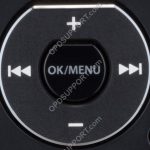
This guide goes through how to change the recording format on the following recorders DS-9500, DS-9100, DS-9000, DS2600, DS2700. If you prefer to change it through the Olympus software then please follow the Recording Format guide. The below image is what you will use to navigate the menu. Press “OK/Menu” to open the Menu Press […]
Office Compatibility
This article details what Office versions are compatible with the latest ODMS version. Note: ODMS can be configured to use your Outlook for email and Word for documents Key = Officially supported = Not supported * = End of life ODMS R7 ODMS R6* Office 365 Office 2019 Office 2016 Office 2013