
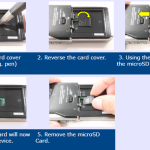
See instructions on removing the MicroSD card in the guide below…
Webmaster
CR-15/CR-21 Compatibility
Read this article to find out more about CR-15 and CR-21 docking station compatibility… DS-9500/DS-9000 with CR-15 Charging via USB cable Yes Charging via AC Adapter Yes Hands free recording via RS-28H Yes Hands free recording via RS-31H Yes DS-7000/DS-3500 with CR-21 Charging via USB cable Yes Charging via AC Adapter Yes Hands […]
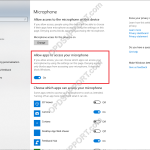
Windows 10 Microphone Privacy Settings
If you are experiencing an issue, whereby your microphone is not detecting any sound then this guide may help fix the issue. This issue affects some Windows 10 users. Check the microphone permissions on the PC by going to Windows settings > Privacy > Microphone. Set Allow apps to access your microphone to ON.
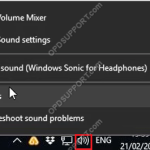
Play Button Flashes and Doesn’t Play
If you experience an issue when pressing the play pedal or clicking on the play button but nothing happens then please follow the steps below to troubleshoot the issue. This issue can occur in any Olympus software version as it could be related to the PC audio. Right click the volume and click Sounds Go […]
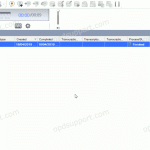
Enabling Typed Comments
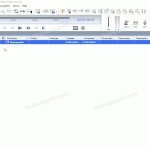
How to enable comments in the ODMS software. Open the software. Press the In-Line Edit button in the top right of the Olympus software highlighted in the image. Alternatively you can click on View then click on In-Line Edit. Now double click on the comment box to make your comment.
Enabling Job Data Settings
This guide goes through how to enable the Job Data Settings, so this lets you review and edit the file properties before downloading them into the software. This setting is only available in the professional range software and can be enabled in Dictation Module and Transcription Module. Click on Tools then Options Click on Workflow […]
Deploying ODMS silently with a volume license
This guide goes through how to deploy ODMS silently in standalone mode with a volume license. Prerequisites The latest ODMS Standalone software which can be downloaded here A license.dat file A network share for storing the ODMS software and license.dat file for software deployment. Process Place the ODMS Standalone software in the network share so it […]
Registering the SCP license
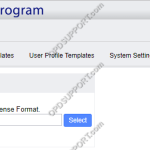
This guide goes through how to register the SCP license file. Note: To obtain or update your SCP license file you must contact your Olympus reseller first to arrange this. Once you have received the SCP license via email please follow the steps below. Access the System Configuration Program via a web browser. Click on […]
License key registry location
Below locations are for 64-bit computers. For 32-bit computers its the same path but you don’t go to WOW6432Node so you just go to Olympus. + – ODMS R7 Click to collapse DM Computer\HKEY_LOCAL_MACHINE\SOFTWARE\WOW6432Node\Olympus\ODMSR7\Dictation Module\Install TM Computer\HKEY_LOCAL_MACHINE\SOFTWARE\WOW6432Node\Olympus\ODMSR7\Transcription Module\Install + – ODMS R6 Click to collapse DM Computer\HKEY_LOCAL_MACHINE\SOFTWARE\WOW6432Node\Olympus\ODMSR6\Transcription Module\Install TM Computer\HKEY_LOCAL_MACHINE\SOFTWARE\WOW6432Node\OlympusODMSR6\Transcription Module\Install SCP Computer\HKEY_LOCAL_MACHINE\SOFTWARE\WOW6432Node\Olympus\ODMSR6\System Configuration Program\Install […]
SCP Backup Tool installation
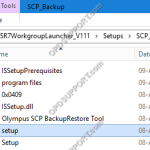
This guide goes through the steps for installing the SCP Backup Tool found in the ODMS R7 Workgroup Launcher. Run the setup application to begin. Click Next. Accept the license agreement and click Next. Specify the location to store the backup files by clicking on Browse. Browse for the folder or […]