
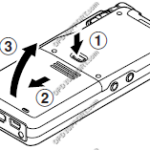
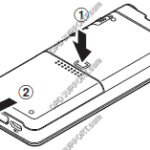
This article goes through the basics of using your mobile recorder. The images in this article may vary for each mobile recorder however the button layout and instructions are very much the same. + – Preparing your recorder Click to collapse Insert the battery Lightly press down on the battery cover release button, then open […]
Webmaster
Quick Start Guide for Authors (Mobile Recorder)
DS-9500, DS-9100, DS-9000, DS2600, DS2700 DS-7000/DS-5500/DS-5000 DS-3500/DS-3400,DS-2500,DS-2400 “DS-9500/DS-9100/DS-9000/DS-2600/DS-2700” This article goes through the basics of using your mobile recorder. The images in this article may vary for each mobile recorder however the button layout and instructions are very much the same. + – Preparing your recorder Click to collapse Insert the battery Lightly press down […]
Quick Start Guide for Authors (RecMic)
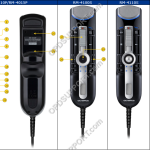
This article goes through the basics of using your RecMic recorder with the ODMS Dictation Module software. RecMic II RecMic RecMic II Quick Start Guide for RM-4010N/4110N//4010P/4110S This article goes through the basics of using your RecMic II Series. Getting Familiar with the Device 1 Primary microphone 16 F2 (Function 2) button 2 Recording three […]
ODMS R8/R7 GUI Overview
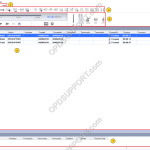
This document will detail the overview of the Graphical User Interface of the Olympus ODMS R8/R7 Dictation and Transcription Module software and explain what each button and section is for. The ODMS R8/R7 supports FTP, which allows for efficient file transfer and management within the system. This functionality is designed to streamline the workflow for […]
Using Real-time Speech Recognition (ODMS R7)
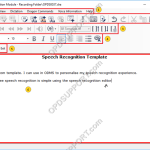
This article goes through how to use Real-time Speech Recognition within ODMS. Note: You must have a Dragon Profile configured with ODMS for this to work please follow the guide here on configuring the Dragon NaturallySpeaking settings. Real-time Speech Recognition settings can be configured please follow the guide here. The Real-time Speech Recognition feature is […]
Real-time Speech Recognition overview (ODMS R8/R7)
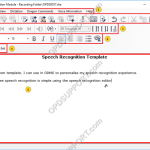
This article details the Real-time speech recognition overview explaining what each section and button does. Note: You must have a Dragon Profile configured with ODMS for this to work please follow the guide here on configuring the Dragon NaturallySpeaking settings. Real-time Speech Recognition settings can be configured please follow the guide here. If you want […]
Text Correction overview (ODMS R8/R7)
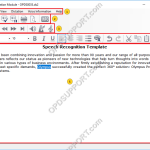
This article details the Text Correction overview explaining what each section and button does. If you want to know how to use the Text Correction window, then you can follow this guide here. The ODMS R8/R7 supports FTP, which allows for efficient file transfer and management within the system. This functionality is designed to streamline […]
How to use Adaptation (ODMS R8/R7)
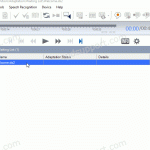
This article details how to use Adaptation. Adaptation helps to improve profile accuracy. Note: You must have a Dragon profile configured in order to do Adaptation please follow the guide here. Dragon will listen to the audio file to carry out two different types of profile adaptation: Acoustic: Listens to the quality of the audio […]
Using Background Speech Recognition (ODMS R8/R7)
This article goes through how to use Background Speech Recognition within the ODMS software. Note: You must have a Dragon Profile configured with ODMS for this to work please follow the guide here on configuring the Dragon NaturallySpeaking settings. Background Speech Recognition settings can be configured please follow the guide here. The Background Speech Recognition […]
How to use Text Correction (ODMS R8/R7)
How to use text correction in ODMS. Text Correction in ODMS will ensure Dragon continues to learn how you pronounce words and phrases. Using text correction in ODMS will ensure changes made to the recognized text are updated in the Dragon profile, improving the accuracy. Note: Dragon doesn’t have to be installed when doing text […]