
If you have forgotten your recorder’s PIN, our support team can help you request a UIN unlock code. To help protect device owners, we verify ownership before issuing a code. This service is available only for supported recorders purchased through authorised OM SYSTEM dealers. Please include your dealer’s details and purchase documentation so we can […]
DS-9100
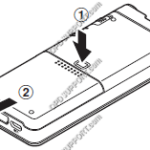
Quick Start Guide DS-9500, DS-9100, DS-9000, DS2600, DS2700
This article goes through the basics of using your mobile recorder. The images in this article may vary for each mobile recorder however the button layout and instructions are very much the same. + – Preparing your recorder Click to collapse Insert the battery Lightly press down on the battery cover release button, then open […]
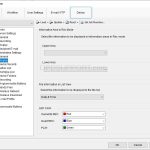
Administrative Display Settings
This guide goes through the Administrative Display settings for the DS-9500/DS-9100/DS-9000 recorder To access this setting you need either the Dictation Module or the Device Customisation Program installed, and have the DS-9500/DS-9100/DS-9000 connected, then click on Device menu > Device Settings > Administrative Settings > Display Information Area Rec Mode You can add Author, Worktypes […]
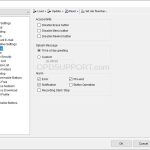
Administrative General Settings
This guide goes through the Administrative General settings for the DS-9500/9100/9000 recorder. To access this setting you need either the Dictation Module or the Device Customisation Program installed, and have the DS-9500/9100/9000 connected, then click on Device menu > Device Settings > Administrative Settings > General Accessibility You can disable Erase, Menu and Rewind buttons […]
Alcohol-wipe Resistant DS-9500/DS-9100/DS-9000 Recorders
Olympus offers alcohol-wipe resistant dictation devices perfect for doctors and healthcare workers who can benefit from Olympus’ commitment to making lives healthier and safer. The DS-9500 and DS-9000 recorders have an alcohol resistant housing, allowing users to keep the device clean in a medical or other environment. Ethanol (76.9 to 81.4 v/v%) or isopropanol (70 v/v%) […]
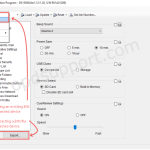
Exporting & Importing .bin Files
This guide will go into detail about how to import and export .bin files for an OM SYSTEM/Olympus Digital Voice Recorder. A .bin file will include user settings for a mobile dictation device (i.e. settings for wireless network, device folders, email profile etc.). This is useful for backing up the device settings before resetting the […]
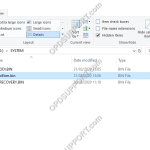
DS-9500, DS-9100, DS-9000, DS2600, DS2700 recorder stuck restarting and preparing firmware update
On rare occasions a firmware update may fail (due to environmental factors), subsequently the DVR can enter into a loop of restarting and preparing the firmware update. Please follow the steps below to fix this issue… Leave the recorder on to drain the battery until its below 50%, this will stop the update process Connect the […]
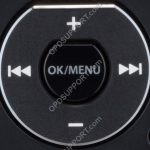
Change Recording Format for DS-9500, DS-9100, DS-9000, DS2600, DS2700
This guide goes through how to change the recording format on the following recorders DS-9500, DS-9100, DS-9000, DS2600, DS2700. If you prefer to change it through the Olympus software then please follow the Recording Format guide. The below image is what you will use to navigate the menu. Press “OK/Menu” to open the Menu Press […]
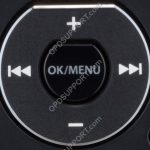
Configure Rev Skip on DS-9500/DS-9100/DS-9000
This guide goes through how to configure the Rev skip function on the DS-9500/DS-9100/DS-9000. The below image is what you will use to navigate the menu Press “OK/Menu” to open the Menu. Press “-” to navigate to the Device Menu and press “OK/Menu”. Press “–” to scroll down to Rev skip and press “OK/Menu”. Select the […]
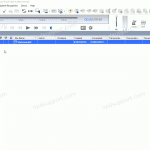
Add Worktype IDs to a DS-9500/DS-9100/DS-9000
For this guide, Worktype IDs must have already been added to the Workflow section. See our Worktype IDs article for instructions. To upload Worktype IDs to a device, go to: Tools > Options > Device > Worktype List Select the Device Type and Device from the drop down menus. Click the Update button and select […]