
If you have forgotten your recorder’s PIN, our support team can help you request a UIN unlock code. To help protect device owners, we verify ownership before issuing a code. This service is available only for supported recorders purchased through authorised OM SYSTEM dealers. Please include your dealer’s details and purchase documentation so we can […]
DS-7000
Instructions for applying the Unlock Code
Only the recorders that are supported by the current professional audio software can have their PIN codes unlocked. For the purposes of this document, the below list of recorders is supported for this process: The PIN unlock process and the tools used are a secure service. Therefore, these tools will not be published publicly nor […]
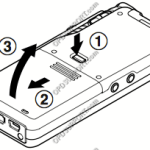
Quick Start Guide DS-7000/5500/5000/2800
This article goes through the basics of using your mobile recorder. The images in this article may vary for each mobile recorder however the button layout and instructions are very much the same. + – Preparing your recorder Click to collapse Insert the battery Lightly press down on the battery cover release button, then open […]
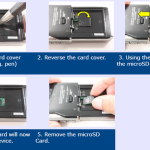
Removing the MicroSD – DS7000/DS3500
See instructions on removing the MicroSD card in the guide below…
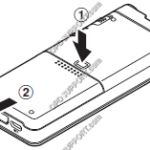
Quick Start Guide for Authors (Mobile Recorder)
DS-9500, DS-9100, DS-9000, DS2600, DS2700 DS-7000/DS-5500/DS-5000 DS-3500/DS-3400,DS-2500,DS-2400 “DS-9500/DS-9100/DS-9000/DS-2600/DS-2700” This article goes through the basics of using your mobile recorder. The images in this article may vary for each mobile recorder however the button layout and instructions are very much the same. + – Preparing your recorder Click to collapse Insert the battery Lightly press down […]
Add Author ID(s) to a device
For this guide, Author ID(s) must have already been added to the Author section. See our Author IDs article for instructions. Up to 10 Author IDs can be applied to a device (either a DS-3500 or DS-7000). Note: This requires the Dictation Module software to configure the device settings. To set an Author ID on […]