
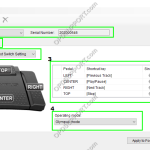
This article will document how to use the foot switch configuration tool The Foot Switch Configuration Tool can be used to customize the settings for the following models: OM SYSTEM RS-27N, RS-28N, and RS-31N Olympus RS-27H, RS-28H, and RS-31H Any combination of keyboard commands can be assigned to each pedal, allowing the control of applications […]
Foot Switch
Changing Foot Switch Settings in Transcription Module
This article will detail how to change foot switch settings in Transcription Module. ODMS R7 ODMS R6 SR2 ODMS R7 Customising foot switch Plug in the foot switch into the PC and open the ODMS Transcription Module software. You can check to see if the foot switch is recognised in the software by an icon […]
How to Lock Pedals on a Foot Switch
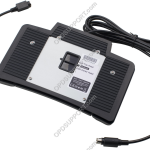
This article will document how you can lock pedals on a RS-31(H) Foot Switch. Lockable Pedals on RS-31(H) Foot Switch You are able to lock either the top or the centre pedal on an RS-31(H) foot switch. On the back of the foot switch there is a lock. Slide up to lock the top pedal […]
Foot control not working
If you are experiencing an issue where you cannot operate any of the pedals on the foot switch, please follow the steps below. Please note that if you mean the play button in the play bar is greyed out and you cannot press play, then follow the Play button Greyed Out guide instead. 1. Check […]
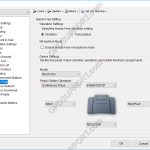
Hands Free Recording Settings
Hands free recording can be useful so you are able to record without the need to operate your OM SYSTEM/Olympus Digital Voice Recorder. By using a docking station and a foot pedal this will allow you to free at least one hand and improve productivity. ODMS R8/R7 ODMS R6 ODMS R8/R7 The hands-free recording settings […]